
 Español
New search
The form is under New search in the side menu. Next to each field there is an i with the long explanation and an example.
The fields
Section titled “The fields”Person, brand or topic
Section titled “Person, brand or topic”What we look for on each platform, in posts and comments. Write it the way people write it. 2 to 120 characters.
- You can add a hashtag together with the topic.
- You cannot search one specific account or leave out words.
- An exact phrase is not guaranteed: each platform decides how strict its own search is.
What you want to know
Section titled “What you want to know”The question you give the analysis. The AI uses it to decide which posts are really about the topic and what the report covers. 3 to 2,000 characters. The more specific, the better. For example: what people think of the new menu and the prices.
Platforms
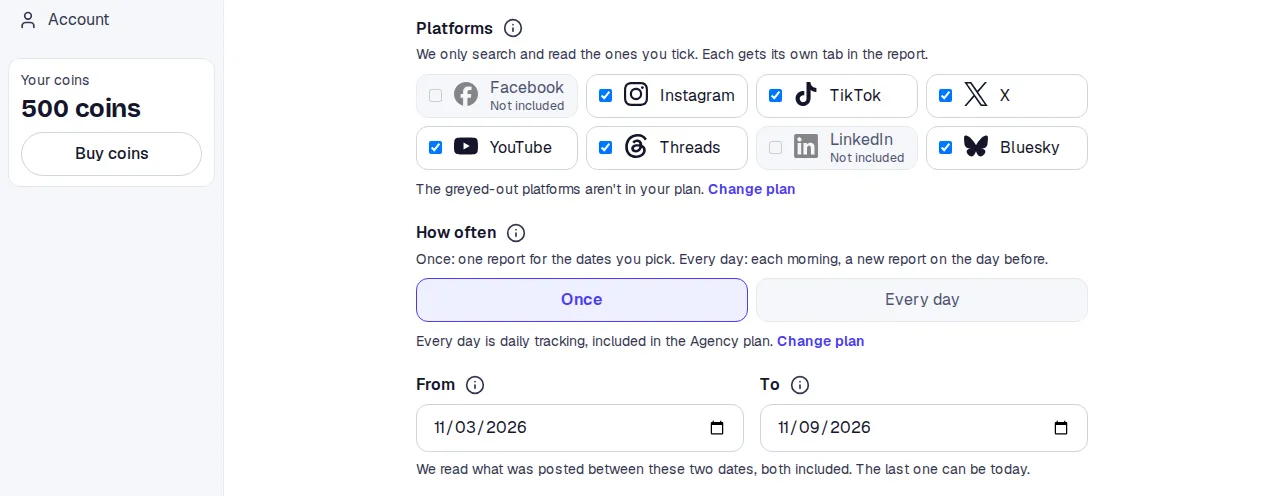
Section titled “Platforms”We search and read only the ticked ones. Each gets its own tab in the report. Pick at least one.
Your plan’s platforms come ticked. Greyed-out ones say Not included and cannot be ticked; the Change plan link takes you to the plans.
How often
Section titled “How often”- Once: one report for the dates you pick.
- Every day: a new report each morning on the day before. That is daily tracking, included in the Agency plan. On other plans the option is off.
From and To
Section titled “From and To”We read what was posted between the two dates, both included. The last one can be today, not later. The last seven days come filled in.
Your plan limits how many days a search can span: 7 on Free, 30 on Premium, 90 on Agency.
How far back it reaches depends on the platform. Some accept an exact past date range; others only give recent results, so for older dates we collect more widely and keep what falls inside your dates.
Report language
Section titled “Report language”Spanish or English. The analysis and its headings come in that language. Posts are read in any language and are always quoted in their own words.
Max tokens
Section titled “Max tokens”This search’s cap, for this one only. Your account’s maximum comes filled in. 1 to 1,000.
1 token reads up to 1,000 posts and comments across all platforms. Below the field you see the sum: up to how many posts and comments, up to how many tokens, and how many you have. What is not read goes back to your balance.

Starting
Section titled “Starting”-
Check the fields. The form marks in red what is missing or out of range.
-
Press Search. If the button is off, confirm your email first.
-
You move to the search’s page. You can close it: we email you when the report is ready.
When tokens run short
Section titled “When tokens run short”If you have fewer tokens than the maximum, the You don’t have enough tokens notice opens. It says how many you have, how many tokens the search is cut to and how many posts and comments that reaches. Below, the pack price per token and the minimum buy.
- Search with N tokens: runs cut to your balance.
- Buy tokens: opens the buy page.
- Go back: closes the notice so you can change the maximum.
Limits and notices
Section titled “Limits and notices”| Notice | What happens |
|---|---|
| Pick at most N days | The range exceeds what your plan allows. |
| X isn’t in your plan | You ticked a greyed-out platform. |
| You have N searches waiting or running | Your plan runs 1, 2 or 5 searches at once. Wait for them to finish. |
| You’ve started N searches in the last 24 hours | The most for one day. Try again later. |
| That’s a lot of searches in one minute | Wait a moment. |
| Confirm your email first | Open the link in the email or ask for another. |
| You don’t have enough tokens: you have 0 | Buy a pack or wait for the month’s tokens. |