
 Español
Export
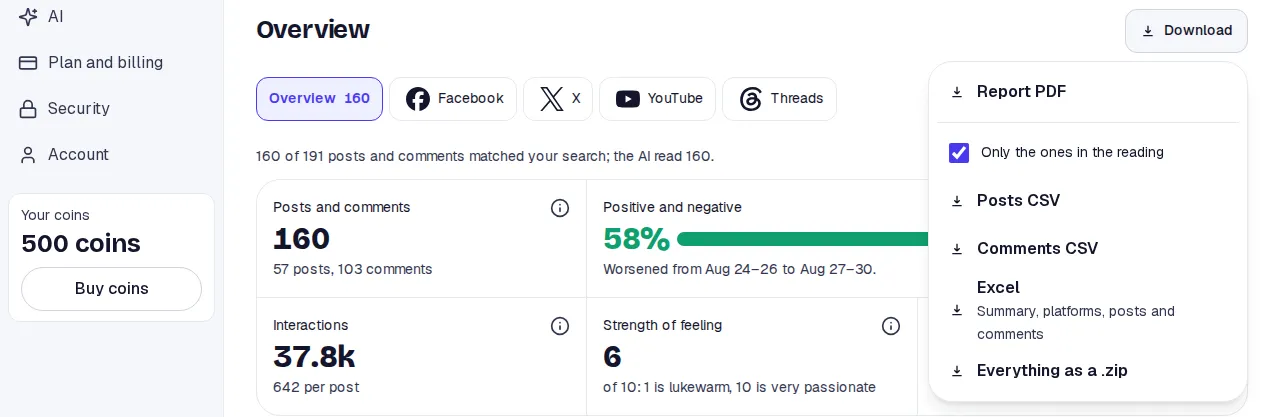
The Download button is in the report’s header, on every tab.
The files
Section titled “The files”| File | What it holds | Plans |
|---|---|---|
| Report PDF | The full report, with its design, in the report’s language. | All |
| Posts CSV | One row per post. | From Premium |
| Comments CSV | One row per comment. | From Premium |
| Excel | A workbook with sheets for the summary, platforms, posts and comments. | From Premium |
| Everything as a .zip | The data files together. | From Premium |
Each data row holds the text, the date, the platform, the link to the original and the likes, comments, shares and views the platform showed that day.
Downloading
Section titled “Downloading”-
Open the report and press Download.
-
For the data files, decide whether to leave Only the ones in the reading ticked. Untick it to include the left-out ones too.
-
Press the file. The browser saves it.
The PDF has no such box: it is the report itself.
What to expect
Section titled “What to expect”- The PDF is prepared on the spot. You can have two preparing at once; if you ask for a third, wait for them to finish.
- If many PDFs are queued, the notice asks you to try again in a minute.
- The files reflect what the search collected. If a post is later deleted or edited, the file does not change.
Limits
Section titled “Limits”- On the Free plan only the PDF is there. The menu names what is missing and links to the plans.
- In a report shared by link there is only the PDF, and only if whoever shared it allowed it. See Share.
- On a daily-tracking day the files are that day’s.