
 Español
Posts and comments
Each platform in the report has two lists: Posts and Comments. Every text is there with its figures and the link to the original.
Opening the list
Section titled “Opening the list”-
In the report, press a platform’s tab.
-
Under the name, press Posts or Comments.
By default you see only what went into the reading. A link says Show the ones left out of the reading too.
Each row
Section titled “Each row”- The author and the date.
- The full text, as posted.
- Likes, comments, shares and views, as the platform showed them that day.
- Open on X or See the post: the original in a new tab.
- A comment also shows what it replies to and which post it is on.
Rows come 50 at a time, with Previous and Next.
The filters
Section titled “The filters”Press Filter to open them. The button says how many are on.
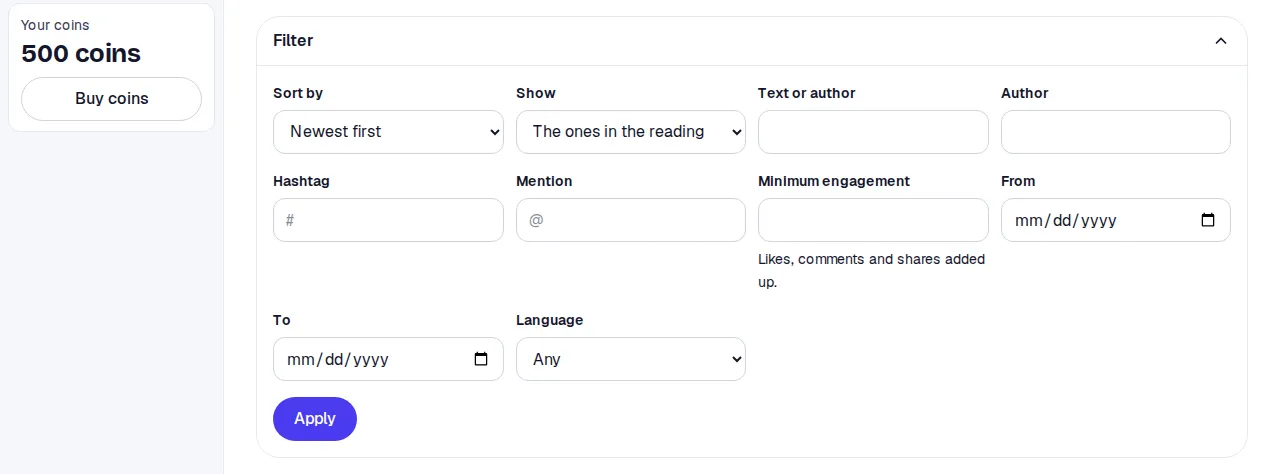
| Filter | What it does |
|---|---|
| Sort by | Newest or oldest first; likes, comments, shares or views highest or lowest first. Comments sort by date or likes. |
| Show | The ones in the reading, all, or only the left-out ones. |
| Text or author | Words in the text or the author’s name. |
| Author, Hashtag, Mention | One account, hashtag or mention. |
| Minimum engagement | For posts, likes, comments and shares added up. For comments, the comment’s likes. |
| From and To | Dates within the search. |
| Language | Only on X and Bluesky, the platforms that record a language. |
Press Apply. The filters stay in the page’s address, so you can copy it and come back later. Clear filters removes them all.
What left out means
Section titled “What left out means”A grey row with a circle is a post or comment that was collected but did not go into the reading. It stays visible so nothing is hidden, but it counts in no figure of the report. The reason is in the row:
| Reason | What happened |
|---|---|
| Off-topic | The AI read it with your question in mind and decided it is not about your topic. For example, another person with the same name. |
| Outside your dates | It was posted before or after the dates you picked. |
| Low engagement | It had fewer likes than the minimum set when the search was created: the Minimum engagement field of a head-to-head. |
| No date | The platform gave no date. |
| Duplicate | An identical one was already there. |
Exporting the list
Section titled “Exporting the list”Download in the report’s header gives the full list as CSV or Excel. See Export.